

Update November 2026: Google has replaced Comparison Listing Ads (CLA) with a new format: CSS Product Listing Ads. This article has been updated to explain what changed and what it means for advertisers.
 Visitors who click through from a Comparison Website to your webshop have already viewed multiple offers – and specifically selected yours. That makes them more product-oriented and more likely to convert.
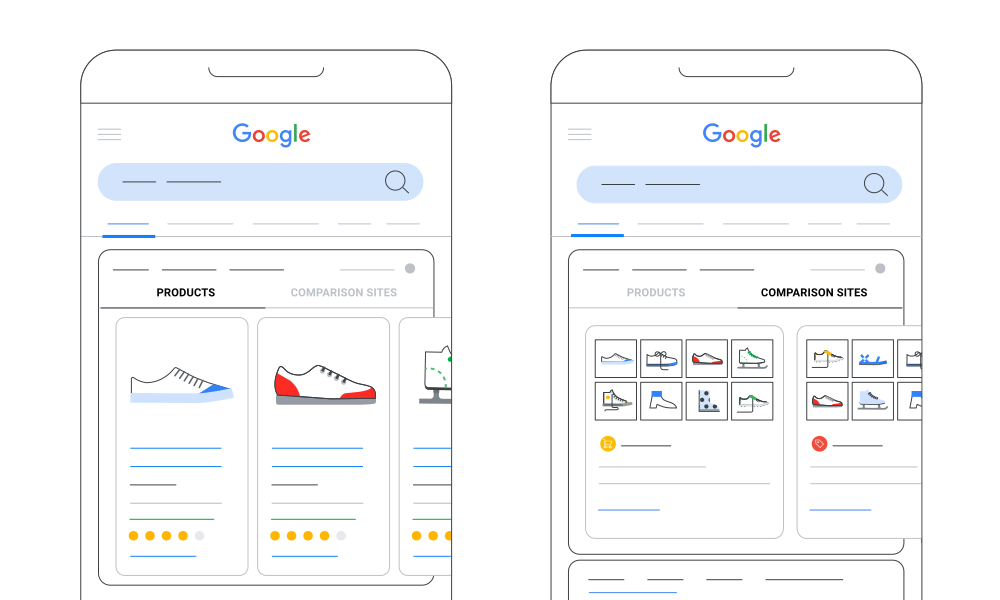
From Comparison Listing Ads to CSS Product Listing Ads: comparison websites now appear in the same Shopping carousel as webshops
Since early 2018, several major Comparison Websites in the Daisycon network have been actively using Google Shopping via CSS (Comparison Shopping Services). Over the years, this group has steadily grown, and today we work with some of the largest and most successful CSS partners in the EU. Through these CSS partners, advertisers promote their products using Product Listing Ads (PLA), such as Google Shopping and Bing Shopping. This format has proven highly effective in driving high-intent traffic to webshops, especially when product feeds are complete and products are competitively priced. In 2024, Comparison Listing Ads (CLA) gave Comparison Websites their own section in Google Shopping. In July 2026, Google replaced this format with CSS Product Listing Ads. The biggest change: Comparison Websites no longer appear in a separate section, but in the same Shopping carousel as the product ads of webshops. In this blog, we explain what CSS Product Listing Ads are, what changed compared to Comparison Listing Ads, and what this means for your webshop.What are Product Listing Ads (PLA / CSS)?
- The PLA media type in Daisycon refers to individual product ads on various shopping platforms, most commonly on Google Shopping.
- Google Shopping ads are typically managed by Comparison Shopping Services (CSS), which advertise product offers from connected webshops.
- Within Daisycon, Google Shopping makes up the majority of PLA traffic, but similar formats also exist on platforms like Bing Shopping.
- Your webshop’s product ads appear directly in the Shopping results, with traffic going straight to your site.
- Advertisers can enable this through the PLA media type, allowing CSS partners to promote their products on these paid shopping platforms.
What are CSS Product Listing Ads?
CSS Product Listing Ads let a Comparison Website advertise products from its own product pages. Like Comparison Listing Ads, they are a result of the EU’s Digital Markets Act (DMA), which pushes Google to give Comparison Shopping Services more visibility.- The ad shows a product image, title, offer price and the number of offers available on the Comparison Website.
- The ads appear in the existing Shopping carousel on Google search results, next to the product ads of webshops.
- According to Google, Comparison Websites compete with merchants there “on a non-discriminatory basis”.
- When a user clicks the ad, they land on a product page of the Comparison Website. That page must show offers from multiple merchants and link directly to the merchant pages where the product can be bought.
Left: a Merchant Product Listing Ad run by a CSS, linking to the webshop. Right: a CSS Product Listing Ad, linking to the comparison website. Source: Google CSS Center Help
What changed compared to Comparison Listing Ads?
| Feature | Comparison Listing Ads (until July 2026) | CSS Product Listing Ads (from July 2026) |
|---|---|---|
| Format | Overview of multiple products from a single CSS | One product with price and number of offers |
| Placement | Separate ‘Comparison sites’ section | Same Shopping carousel as webshop product ads |
| Competition | Separate from standard product ads | Competes with webshop product ads |
| User click goes to | The Comparison Website | A product page on the Comparison Website |
| Billing | Click costs paid by the CSS partner | Click costs paid by the CSS partner |
| Media type in Daisycon | Comparison Websites | Comparison Websites |
The former Comparison Listing Ads layout, with a separate ‘Comparison sites’ tab. With CSS Product Listing Ads, this separate tab is gone and comparison websites appear in the regular Shopping carousel. Source: Google Ads Support
Why this matters for advertisers
The Shopping carousel is now shared by three types of ads: your own Shopping campaigns, the Product Listing Ads that CSS partners run for your webshop, and the CSS Product Listing Ads of Comparison Websites. The space in the carousel stays the same, so there is more competition for the same positions. For advertisers, this means two things:- Comparison Websites have become more visible. Their ads now appear right next to webshop ads instead of in a separate section.
- Being listed on Comparison Websites matters more. If a shopper clicks a CSS Product Listing Ad and your offer is on that comparison page, you can still win the sale. If it isn’t, your competitor gets the chance.
What if your products are not listed?
Some advertisers choose not to work with Comparison Websites, or prefer not to have their products promoted via Google Shopping through the affiliate channel. With CSS Product Listing Ads, it’s important to understand what that means in practice.- These ads are created per product, not per advertiser, and the comparison page always shows offers from multiple merchants.
- If your competitors sell the same or similar products, their offers will appear on the Comparison Websites, and therefore also in the Shopping carousel.
- Your offer may be missing from the comparison, while your competitor gets the click.
- Comparison Websites will continue to show available offers, even if your webshop isn’t one of them.
How to get started
- Ensure your product feed is up to date, complete and competitively priced.
- Work with high-quality Comparison Websites and CSS partners that are active in the Daisycon network.
- Monitor your campaign performance and reach out to your campaign manager for insights.


